How to fill the form of photo retouching


You must read and click “Terms of Photo Retouching”

You may confirm your username and contact details and related information about the photos.

Attention: When you start photo listing, we are assuming you have got all the original photos


General Comments: It is for overall requirement for batch pictures, eg. please remove the pimple on my face, make all pictures of farm retro style.

You must make sure the filenames are all correct, otherwise they cannot be extracted correctly.

Prefix Presetting, attention: just prefix, not filename if your filename is 20180118jackychan_lupins0216,then prefix must be 20180118jackychan_lupins****.

the number of stars asterik stands for how many digitals, you may input the number only below field

if any mistakes, just delete and re-input new one. If this groups is error, you have delete this group. see the button on right.

If you have different prefix, just press button, add new Prefix

Filename, You may just input the digital numbers only, which could be the serial number of your file name. then the full filename will be shown below.

Single Remark,it is the remark for this pictures only.

If you have not done photo choice completely, and continue another time, you may press the button, Save

Preview button, all details you have filled will be generated as a form. All filenames are resorted as A-Z.

Once you complete all, please press Save+Submit
Create Task1—Profile

a. Task-Task List, click Add button.

b. for customer interface, go to Orders, click Add button. Yes, the customers can create the order like shopping.However, the order created by customer needs sales to complete the rest jobs. The order once created by customer,  the email reminder will be sent to sales team.

The order number is generated automatically and at random, but you still may change the number. In regarding to the presetting of oder number, please click here

Sales, this field is not open to customer, as this is bound to sales commission.

Package:drop-down menu is listed by popularity order.

Breif: the reminder for assigned staff, customers cannot see it, you may change the highlight colour. eg. please bring the drone.

Original price and sale price: the original price is shown once the package is chosen, however maybe the final price is not same as the original price because of some reason: discount, extra service, extended hour.

Email reminder, once the status is changed, you may send customer email reminder

Attention:  some email templates are bound with the documents, like contract, invoice,  you must create the document first then do so.


Client Permission,and order

The customers can activate account via email verification.

After activation, you may:

  • edit personal profile, mobile number, address, social accounts;
  • you may place the order, you may choose the desired package and order.
  • you may check and download the copies of signed contract
  • you may view the invoices
  • you may fill the Photo Retouching Form online.

Customer Registration and Logon

mebemr login address: your URL./memberlogin.aspx

Logon, Registration, Password Recovery

Register by email verification.

After verification, the account is activated, the client should completed the personal profile.

Period Comparision

you may compare your turnover by same period of different years.

Colour Selector

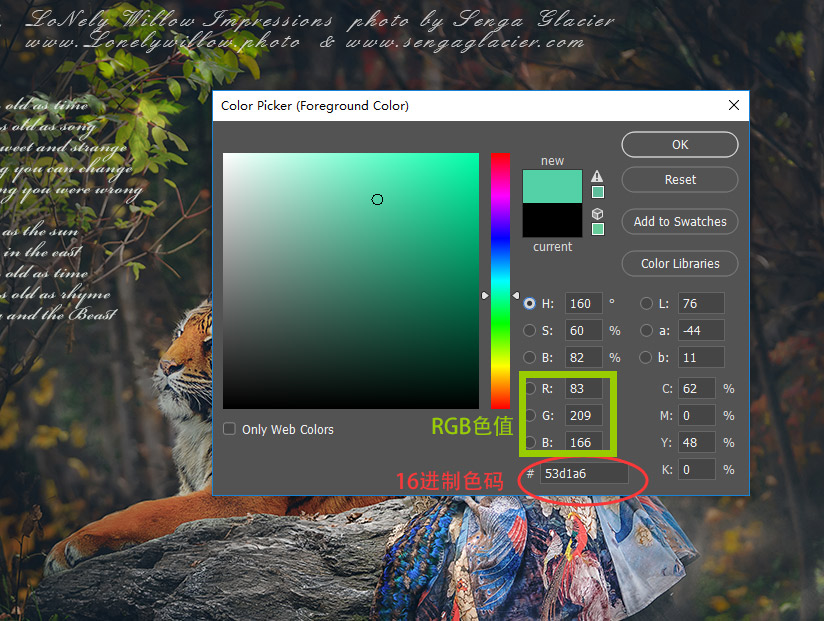
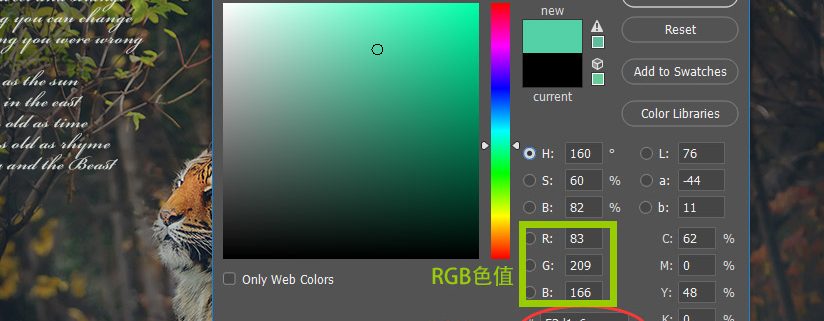
Both RGB code and Hex code run properly for web UI, however, the Hex Code looks more popular as it include transparence/alpha value, which is more tense.

The most popular one is Hex, what is Hex? it a combination following #

Besides the web WSWYG editor, shall i get 100% colour customisation?

Yes, you may find it on Photosp.


You may just copy the combination, remember, you need to add # after you copy it into the web page.


Colour Code

Colour CSS Name Hex Code RGB
LightPink #FFB6C1 255,182,193
Pink #FFC0CB 255,192,203
Crimson #DC143C 220,20,60
LavenderBlush #FFF0F5 255,240,245
PaleVioletRed #DB7093 219,112,147
HotPink #FF69B4 255,105,180
DeepPink #FF1493 255,20,147
MediumVioletRed #C71585 199,21,133
Orchid #DA70D6 218,112,214
Thistle #D8BFD8 216,191,216
plum #DDA0DD 221,160,221
Violet #EE82EE 238,130,238
Magenta #FF00FF 255,0,255
Fuchsia #FF00FF 255,0,255
DarkMagenta #8B008B 139,0,139
Purple #800080 128,0,128
MediumOrchid #BA55D3 186,85,211
DarkVoilet #9400D3 148,0,211
DarkOrchid #9932CC 153,50,204
Indigo #4B0082 75,0,130
BlueViolet #8A2BE2 138,43,226
MediumPurple #9370DB 147,112,219
MediumSlateBlue #7B68EE 123,104,238
SlateBlue #6A5ACD 106,90,205
DarkSlateBlue #483D8B 72,61,139
Lavender #E6E6FA 230,230,250
GhostWhite #F8F8FF 248,248,255
Blue #0000FF 0,0,255
MediumBlue #0000CD 0,0,205
MidnightBlue #191970 25,25,112
DarkBlue #00008B 0,0,139
Navy #000080 0,0,128
RoyalBlue #4169E1 65,105,225
CornflowerBlue #6495ED 100,149,237
LightSteelBlue #B0C4DE 176,196,222
LightSlateGray #778899 119,136,153
SlateGray #708090 112,128,144
DoderBlue #1E90FF 30,144,255
AliceBlue #F0F8FF 240,248,255
SteelBlue #4682B4 70,130,180
LightSkyBlue #87CEFA 135,206,250
SkyBlue #87CEEB 135,206,235
DeepSkyBlue #00BFFF 0,191,255
LightBLue #ADD8E6 173,216,230
PowDerBlue #B0E0E6 176,224,230
CadetBlue #5F9EA0 95,158,160
Azure #F0FFFF 240,255,255
LightCyan #E1FFFF 225,255,255
PaleTurquoise #AFEEEE 175,238,238
Cyan #00FFFF 0,255,255
Aqua #00FFFF 0,255,255
DarkTurquoise #00CED1 0,206,209
DarkSlateGray #2F4F4F 47,79,79
DarkCyan #008B8B 0,139,139
Teal #008080 0,128,128
MediumTurquoise #48D1CC 72,209,204
LightSeaGreen #20B2AA 32,178,170
Turquoise #40E0D0 64,224,208
Auqamarin #7FFFAA 127,255,170
MediumAquamarine #00FA9A 0,250,154
MediumSpringGreen #00FF7F 0,255,127
MintCream #F5FFFA 245,255,250
SpringGreen #3CB371 60,179,113
SeaGreen #2E8B57 46,139,87
Honeydew #F0FFF0 240,255,240
LightGreen #90EE90 144,238,144
PaleGreen #98FB98 152,251,152
DarkSeaGreen #8FBC8F 143,188,143
LimeGreen #32CD32 50,205,50
Lime #00FF00 0,255,0
ForestGreen #228B22 34,139,34
Green #008000 0,128,0
DarkGreen #006400 0,100,0
Chartreuse #7FFF00 127,255,0
LawnGreen #7CFC00 124,252,0
GreenYellow #ADFF2F 173,255,47
OliveDrab #556B2F 85,107,47
Beige #F5F5DC 245,245,220
LightGoldenrodYellow #FAFAD2 250,250,210
Ivory #FFFFF0 255,255,240
LightYellow #FFFFE0 255,255,224
Yellow #FFFF00 255,255,0
Olive #808000 128,128,0
DarkKhaki #BDB76B 189,183,107
LemonChiffon #FFFACD 255,250,205
PaleGodenrod #EEE8AA 238,232,170
Khaki #F0E68C 240,230,140
Gold #FFD700 255,215,0
Cornislk #FFF8DC 255,248,220
GoldEnrod #DAA520 218,165,32
FloralWhite #FFFAF0 255,250,240
OldLace #FDF5E6 253,245,230
Wheat #F5DEB3 245,222,179
Moccasin #FFE4B5 255,228,181
Orange #FFA500 255,165,0
PapayaWhip #FFEFD5 255,239,213
BlanchedAlmond #FFEBCD 255,235,205
NavajoWhite #FFDEAD 255,222,173
AntiqueWhite #FAEBD7 250,235,215
Tan #D2B48C 210,180,140
BrulyWood #DEB887 222,184,135
Bisque #FFE4C4 255,228,196
DarkOrange #FF8C00 255,140,0
Linen #FAF0E6 250,240,230
Peru #CD853F 205,133,63
PeachPuff #FFDAB9 255,218,185
SandyBrown #F4A460 244,164,96
Chocolate #D2691E 210,105,30
SaddleBrown #8B4513 139,69,19
SeaShell #FFF5EE 255,245,238
Sienna #A0522D 160,82,45
LightSalmon #FFA07A 255,160,122
Coral #FF7F50 255,127,80
OrangeRed #FF4500 255,69,0
DarkSalmon #E9967A 233,150,122
Tomato #FF6347 255,99,71
MistyRose #FFE4E1 255,228,225
Salmon #FA8072 250,128,114
Snow #FFFAFA 255,250,250
LightCoral #F08080 240,128,128
RosyBrown #BC8F8F 188,143,143
IndianRed #CD5C5C 205,92,92
Red #FF0000 255,0,0
Brown #A52A2A 165,42,42
FireBrick #B22222 178,34,34
DarkRed #8B0000 139,0,0
Maroon #800000 128,0,0
White #FFFFFF 255,255,255
WhiteSmoke #F5F5F5 245,245,245
Gainsboro #DCDCDC 220,220,220
LightGrey #D3D3D3 211,211,211
Silver #C0C0C0 192,192,192
DarkGray #A9A9A9 169,169,169
Gray #808080 128,128,128
DimGray #696969 105,105,105
Black #000000 0,0,0

Domains and sub-domains

after domain registration finished, you could have

website, visiting by domain

business email, setting by domain DNS control.

Of course, xxx@yourname.com looks more professional and decent than gmail, hotmail which are free to everyone.

Sub-domain, yes, this is quite important. Once you have top domain for your formal website, you may set one sub-domain for your management software.

For example, members.yourdomain.com is for online CRM, and your website is www.yourdomain.com

NO extra cost for sub-domains generally.

Please go to the dashboard to set the DNS resolve to our hosting.

we may help you to do that if you feel very trouble about that.

Perhaps it is not possible you could register .com,.net which are too popular, please turn to some domain with countries, eg. com.au, .co.nz.

Or you still want to be international? try some professional extensions.

eg..photo, .photography, .studio, .design, .auto, etc.

Hopefully you have sufficient budget to register all of them!


Create Task2—the Remarks and Job Summary

It will be very convenient that the staff could have a sheet showing all information about the job on the day.

go to Tab — Remark

When shall we arrive customer’s place, booking for accommodation, car rental, etc.

You may just copy and past all of them into one sheet, and print it off, it is the easiest.

go to Tab—Job Summary —- Print

The post-production and tracker

Task List–View/Edit–Post-production

this tab including physical gifts and digital visual gifts.

by supplier: you may choose the supplier or google drive, dropbox etc, not compulsory.

Ref.Code: this could be ref number of post, or share link of web disk

Remark: anything else you want to put on the email to the client, please write down here

Invoicing

Amount In. How much you get from clients.

Casher: who receipts the money

the invoicing amount is generated by the Details, NOT  AMOUNT IN.


Different Items of invoices

If total invoice amount is $2000.00, $1500 is photography, $500 is extra retouching, you add them in this field.

You are allowed to set TWO different templates.

simple receipt and formal invoice.