
Image Optimisation(jpg, pdf)-make your pictures smaller but look good
In order to improve your website’s performance.You should reduce your image’s file sizes。
Most of photographers know little about image optimisation, even photographers’ website show heaps of large pictures with full screen definition.
For web view, go to photoshop, save as, choose 7-9 is better than 12.
If you need batch optimisation, you could use Lightroom or Bridge Batch…
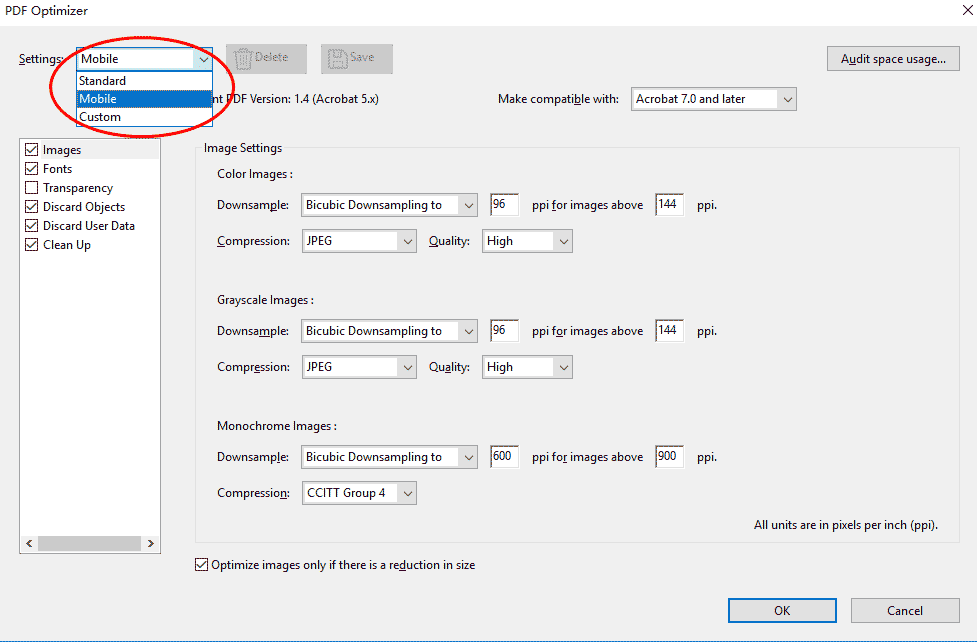
Pdf optimisation, go to Acrobat, save as pdf, Adobe PDF file, optimized, setting
Optimisation for logos: given that you have vector file of the logo, you may choose .svg or gif on web page, .emf for Microsoft documents(docx, exl). However, if you need to apply your logo on picture, you may choose .png
Leave a Reply
Want to join the discussion?Feel free to contribute!